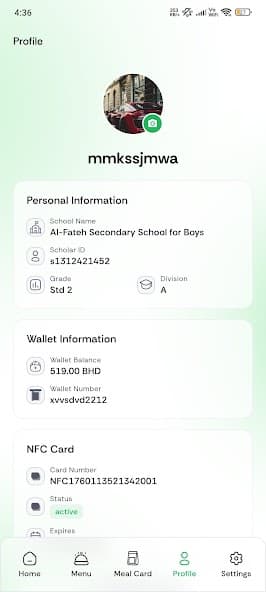
Food City brings menu discovery, package selection, wallet visibility, meal planning and NFC collection together in one clear school-meal journey for parents, students and staff.
A connected experience designed to make package-based school meals easier to understand and manage.
01
Download and create your profile
Parents create a profile for each student. Eligible school staff can create their own school-linked profile in the same Food City Canteen Mate app.
Choose the participating school
Add the student grade and class
Keep account details together securely
02
Explore original Food City recipes
Browse the published school menu with original recipe images, descriptions, categories and available meal information.
Clear recipe photography
English and Arabic menu information
Ingredients and allergen details where published
03
Choose the right meal package
Select an active package for the student's education level or an eligible staff package. Individual meals are not purchased separately.
Database-published package groups
Weekly or monthly availability
Package benefits shown before selection
04
Review the package before payment
Review included dates, meal choices, package rules, wallet use and the complete package total before confirming in the app.
One complete package purchase
Clear school-calendar dates
Secure supported payment journey
05
Stay organized throughout the week
Use the app to review upcoming meals and manage eligible changes before the displayed school and package cutoffs.
Upcoming meal calendar
Eligible skips or pauses
Meal swaps subject to availability and rules
06
Tap, confirm and collect at school
The linked NFC Meal Card helps identify the account and confirm a meal that is included in the active package.
Fast account identification
Package entitlement confirmation
A simple school collection experience
Everything connected
More than a menu. One complete meal experience.
The Food City concept connects the package, wallet, NFC Meal Card and eligible meal changes so families and staff have a clearer view of the school week.
Smart package wallet
Keep wallet activity, eligible package payments and qualifying refunds visible in one place.
NFC Meal Card
Use the linked card for quick account identification and confirmation of an included package meal.
Eligible meal swaps
Request an available alternative before the displayed cutoff when the package rules allow it.
One convenient app
Manage student profiles or an eligible staff account, packages, meals and updates from one app.
A smarter cashless model
Package payment in the app. Simple collection at school.
Food City separates payment from daily collection: users purchase the complete package through supported digital methods, while the NFC Meal Card helps identify the account when an included meal is collected.
No cash needs to change hands at the school counter
No individual meal is purchased during collection
Wallet and package activity stays visible digitally
Select the complete package, review its dates and confirm through the supported digital payment journey.
02
Keep package funds visible
Review wallet balance, package payment activity and qualifying wallet refunds without handling cash at school.
03
Tap the NFC Meal Card
The card identifies the linked account and helps confirm an included meal from the active package.
04
Maintain a clear digital record
Package confirmations and wallet activity remain visible for easier review and support.
Important distinctionThe NFC Meal Card is used for account identification and package-meal confirmation; it is not advertised as a bank card or a way to buy separate meals.
Food City Canteen Mate App
Your smart canteen companion
School meals in your pocket.
Download the Food City Canteen Mate app to choose student or staff packages, manage included meals, review wallet activity and request eligible swaps.